
How to Create a Color Palette from a Photo: A Complete Makeup Artist's Guide
Learn professional techniques to extract the perfect color palette from any photo and transform it into stunning makeup looks with AI-powered precision.
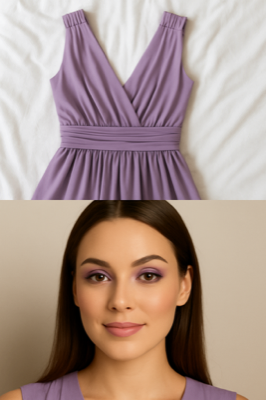
✨ Quick Answer
Creating a color palette from a photo involves identifying the dominant colors, complementary shades, and undertones present in your image. The MakeupAI app makes this process effortless by automatically analyzing your photos and suggesting perfectly coordinated makeup colors that match your outfit or inspiration image.
Why Create a Color Palette from Photos?
As a makeup artist with over a decade of experience, I've seen countless clients struggle with color coordination. Creating a color palette from photos is a game-changing technique that ensures your makeup always complements your outfit, matches your inspiration, and enhances your natural beauty.
🎨 Benefits of Photo-Based Color Palettes:
- Perfect coordination between your makeup and outfit
- Harmonious color schemes that enhance your skin tone
- Professional-looking results every time
- Inspiration from anywhere - nature, fashion, art
- Saves time on makeup selection and planning
Step-by-Step Guide: Creating Your Color Palette
Step 1: Choose Your Inspiration Photo
Start with a high-quality photo that inspires you. This could be:
- Your outfit of the day
- A sunset or nature scene
- Fashion inspiration from Pinterest
- Art or interior design photos
- Seasonal color themes
Step 2: Identify Dominant Colors
Look for the 3-5 most prominent colors in your photo:
- Primary color: The most dominant shade
- Secondary colors: Supporting hues that complement
- Accent colors: Smaller pops of color for drama
- Neutral base: Grounding tones like beiges, grays
Step 3: Analyze Undertones
Understanding undertones is crucial for makeup harmony:
- Warm undertones: Gold, yellow, peach bases
- Cool undertones: Pink, blue, silver bases
- Neutral undertones: Balanced mix of warm and cool
Step 4: Map Colors to Makeup Products
Transform your palette into a complete makeup look:
Eyes:
- Use dominant colors for eyeshadow
- Accent colors for eyeliner
- Neutral tones for blending
Lips & Cheeks:
- Secondary colors for lip color
- Softer tones for blush
- Highlighting with light accents
🚀 The AI-Powered Shortcut
While manual color extraction is educational, MakeupAI revolutionizes this process with artificial intelligence. Simply upload your photo, and our advanced AI instantly:
- ✨Analyzes color harmony and undertones
- 🎨Suggests coordinated makeup colors
- 💄Matches your skin tone perfectly
- ⚡Delivers results in seconds
Pro Tips from a Makeup Artist
🌟 Color Theory Basics
- Complementary colors create dramatic contrast
- Analogous colors blend harmoniously
- Monochromatic schemes use varying shades of one color
- Triadic combinations offer vibrant yet balanced looks
💡 Application Tips
- Start with lighter shades and build intensity
- Use 60-30-10 rule: dominant, secondary, accent
- Blend thoroughly between color transitions
- Consider lighting conditions where you'll be
Common Mistakes to Avoid
❌ What NOT to Do:
- Ignoring your skin's undertones - This leads to clashing colors
- Using too many bright colors - Keep it balanced with neutrals
- Copying colors exactly - Adapt intensity for wearability
- Forgetting about lighting - Colors look different in various lights
- Skipping the blending step - Harsh lines ruin the harmony
Seasonal Color Palette Ideas
🍂 Autumn Palette
Perfect for warm undertones:
- Burnt oranges and deep reds
- Golden browns and bronze
- Warm burgundy and plum
- Champagne highlights
❄️ Winter Palette
Ideal for cool undertones:
- Deep blues and purples
- Silver and cool grays
- True reds and berry tones
- Icy highlights
🎯 Quick Success Formula
For guaranteed results every time:
- Choose a photo with clear, appealing colors
- Extract 3-5 main colors using MakeupAI
- Test how colors look against your skin
- Adapt intensity for day vs. night wear
- Practice the look before your big day
Frequently Asked Questions
Q: Can I use any type of photo for color inspiration?
A: Yes! Fashion photos, nature scenes, artwork, and even food photography can provide excellent color inspiration. The key is choosing images with colors that flatter your skin tone.
Q: How many colors should I include in my makeup palette?
A: For daily wear, 3-4 colors work best (one dominant, 1-2 supporting, one neutral). For special occasions, you can expand to 5-6 colors for more drama and complexity.
Q: What if the colors in my photo don't suit my skin tone?
A: This is where AI tools like MakeupAI excel - they automatically adjust the extracted colors to complement your specific skin tone and undertones, ensuring the final palette is flattering on you.
Ready to Create Your Perfect Color Palette?
Stop guessing and start creating gorgeous, coordinated makeup looks with confidence. MakeupAI's advanced color analysis technology makes it easier than ever to extract the perfect palette from any photo.